
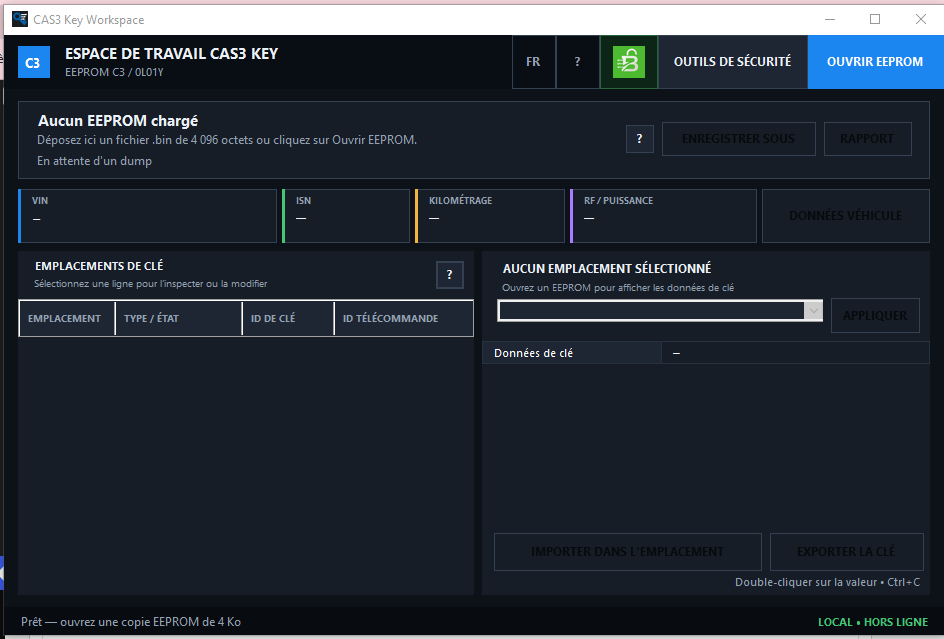
About this software
The required CAS input is an exact 4,096-byte EEPROM dump. Do not load the 256 KB CAS Flash as the primary EEPROM file.
Open and validate BMW CAS3 C3 / 0L01Y EEPROM dumps
Display the VIN, short ISN and long 16-byte ISN
Display the stored CAS mileage
Identify the RF frequency profile and power class
Inspect all available CAS key slots
Display key type, status, Key ID, Remote ID and internal key data
Change the type or status of an individual key slot
Import a compatible .key file into one selected slot
Export the selected slot as a compatible .key file
Edit VIN, short ISN, RF profile and power class
Reset the supported CAS mileage block to zero
Export a readable TXT report
Extract the short ISN from supported DME and DDE dumps
Validate the factory long ISN structures stored inside CAS
Export a verified stock ELV-disabled Flash for CAS3 C3 / 0L01Y
Main Functions#
Open and validate BMW CAS3 C3 / 0L01Y EEPROM dumps
Display the VIN, short ISN and long 16-byte ISN
Display the stored CAS mileage
Identify the RF frequency profile and power class
Inspect all available CAS key slots
Display key type, status, Key ID, Remote ID and internal key data
Change the type or status of an individual key slot
Import a compatible .key file into one selected slot
Export the selected slot as a compatible .key file
Edit VIN, short ISN, RF profile and power class
Reset the supported CAS mileage block to zero
Export a readable TXT report
Extract the short ISN from supported DME and DDE dumps
Validate the factory long ISN structures stored inside CAS
Export a verified stock ELV-disabled Flash for CAS3 C3 / 0L01Y
The software processes files locally. Reading or writing the physical CAS, DME or DDE must be performed separately using compatible professional programming equipment.
Supported CAS EEPROM#
The main workspace is designed for:
BMW CAS3 C3
Motorola/Freescale MCU mask 0L01Y
EEPROM size: exactly 4,096 bytes
When a compatible EEPROM is opened, the application performs integrity checks before enabling editing functions.
The loaded file panel displays:
Source filename
Full path to the opened BIN
File-validation result
VIN
Short ISN
Mileage
RF frequency profile
Power class
Clicking the displayed file path copies the complete path to the Windows clipboard.
CAS3 and CAS3+ Compatibility Boundary#
This release is specifically intended for CAS3 C3 / 0L01Y.
It should not be treated as a generic editor for encrypted CAS3+, CAS3++ or ISTAP variants. Do not load dumps from other MCU masks, including 0L15Y or 0M23S, based only on a similar filename or file size.
Always identify the physical CAS module and MCU mask before processing its data.
Key Slot Workspace#
The KEY SLOTS table provides a detailed view of every available key record stored in the loaded CAS EEPROM.
For each slot, the program can display:
Slot number
Key type and current status
Key ID
Remote ID
Key synchronization data
Key low and high values
Remote synchronization values
Configuration, password and auxiliary bytes
Supported slot states include:
Service key
Remote key
Keyless Go
Unused
Blocked
Select a slot, choose the required status and click APPLY to change that slot in the working copy.
Changing one slot does not automatically modify the remaining key records.
Key Import and Export#
IMPORT INTO SLOT replaces the data of the currently selected key slot using a compatible .key file.
EXPORT KEY saves the selected slot as a compatible .key file for backup, comparison or authorized module-replacement work.
Important behavior:
Only the selected slot is replaced during import
The complete EEPROM is not replaced by a .key file
The original source file remains unchanged until an edited copy is saved
Double-clicking a displayed key value copies it to the clipboard
Before importing key data, export the existing slot or preserve the complete original EEPROM.
Vehicle Data Editor#
The integrated VEHICLE DATA window provides access to the supported vehicle-related fields stored in CAS.
Available functions include:
Edit the complete VIN
Edit the short ISN
Change the RF frequency profile
Change the power class
Reset the supported mileage block to zero
Available RF profiles include:
315 MHz
315 MHz + LP
434 MHz
868 MHz
Unknown
Changes are first held in the application’s working memory. They are written to disk only after the user saves a new EEPROM copy.
The mileage function resets the supported CAS mileage block to 0 km. It is not an automatic vehicle-wide mileage synchronization function.
Long 16-Byte CAS ISN#
CAS3 Data & Key Workspace can detect and validate the factory long ISN information stored in compatible CAS data.
The validation process checks:
Three original 17-byte CAS records
Record checksums
Mirrored copies
Agreement between the available structures
When a valid long-ISN record is present, the resulting 16-byte ISN is displayed for authorized comparison and synchronization work.
If the required factory structures are not present or do not pass validation, long-ISN editing remains disabled.
DME and DDE ISN Reader#
The SECURITY TOOLS window includes a dedicated DME/DDE dump reader for extracting a short ISN from supported ECU files.
Verified coverage includes:
Siemens MS45.0 / MS45.1 — FULL Flash, exactly 1 MB
Siemens MSV70 — FULL Flash, exactly 2 MB
Bosch ME9 — FULL Flash, exactly 1 MB
Bosch ME9.2 — FULL Flash, exactly 2 MB
Bosch EDC16 — EEPROM containing three matching ISN markers
Siemens MSS65 — MPC file
Because some supported ECU formats use overlapping file sizes, the correct ECU family must be selected manually. The application does not guess the ECU type from file size alone.
After a valid ISN is detected, the extracted value can be copied using the dedicated COPY button.
The DME/DDE reader extracts and displays the ISN. It does not automatically write the extracted value into the open CAS EEPROM.
Verified ELV-Disabled Flash Export#
The Security Tools window can export a verified stock ELV-disabled Flash intended specifically for:
BMW CAS3 C3
MCU mask 0L01Y
The exported image has an exact size of:
262,144 bytes
The embedded image is checked internally by the application using SHA-256 before export.
Exporting the ELV-disabled image does not modify the currently opened 4 KB EEPROM.
Use this Flash only with a compatible CAS3 C3 / 0L01Y module. Preserve the vehicle’s original Flash before programming and follow a verified recovery procedure.
TXT Report Export#
The REPORT function creates a readable TXT summary of the information detected in the loaded EEPROM.
Depending on the available data, the report can include:
Source filename and path
VIN
Short and long ISN information
Mileage
RF profile
Power class
Key-slot overview
Relevant validation results
The report is intended for workshop records, comparison and verification. It does not modify the source EEPROM.
Interface Languages#
CAS3 Data & Key Workspace provides 34 fully supported interface languages plus a separate System · Auto mode.
In System · Auto mode, the application automatically follows the current Windows display language. The language can also be selected manually through the two-letter language button in the upper toolbar.
The selected preference is shared by both CAS applications and remains saved between launches.
Spoiler: Show all 34 supported interface languages
The Arabic translation includes a right-to-left interface layout.
Localized Built-In Help#
Small ? buttons are available beside saving, key-slot operations and advanced security functions.
The built-in help explains:
The purpose of the selected function
The required input file
Expected file size or memory area
Which data will be modified
Which data will remain unchanged
The recommended backup and verification procedure
Help content follows the selected interface language.
Quick Working Procedure#
Create and securely store an untouched copy of the original CAS EEPROM.
Click OPEN EEPROM.
Select an exact 4,096-byte CAS3 C3 / 0L01Y EEPROM file.
Review the integrity result, VIN, ISN, mileage, RF profile and power class.
Inspect the key-slot table.
Select the required key slot before applying a status change or importing a key.
Use VEHICLE DATA for VIN, short ISN, RF, power-class or mileage-block operations.
Use SECURITY TOOLS for long ISN validation, DME/DDE ISN extraction or ELV Flash export.
After making EEPROM changes, click SAVE COPY / SAVE EDITED.
Save the result under a new filename.
Do not overwrite the only available original dump.
Keyboard Shortcuts and Quick Actions#
Ctrl+O — open an EEPROM file
Ctrl+S — save an edited EEPROM copy
Ctrl+R — export a TXT report
F6 — open Security Tools
Click the VIN or ISN in the top information bar to copy it
Double-click a selected key value to copy it
Click the displayed BIN path to copy the complete file path
Use the dedicated COPY button to copy an ISN extracted from a DME/DDE dump
Safe Working Procedure#
Keep the untouched original EEPROM in a separate location.
Open an exact 4,096-byte EEPROM, not the 262,144-byte CAS Flash.
Perform all changes on a working copy.
Save the result under a new and clearly identifiable filename.
Compare the original and edited files before programming.
Verify VIN, ISN, mileage and key-slot information using another suitable professional tool.
Preserve the vehicle’s original CAS Flash before using an ELV-disabled image.
Use a stable vehicle power supply and a reliable programming connection.
Do not interrupt an active CAS programming operation.
This software is intended for authorized module replacement, data recovery, professional locksmith work and legitimate vehicle repair.
Reviews
There are no reviews yet.